A contractor bill format in Excel should show five things: who the bill is from and for, the work completed with quantities and rates, the gross amount, each deduction listed separately, and the net amount payable. For a running account (RA) bill, the key calculation is:
Current-period bill value = Cumulative value of work completed to date − Previous cumulative value already billed or certified
A contractor bill is more than a request for payment. It is a record of the work completed, the amount payable, deductions made and the balance remaining under a construction contract.
On an active construction project, contractors may submit bills at regular intervals instead of waiting until the entire project is complete. These are commonly known as Running Account (RA) Bills.
Without a proper billing format, even a small calculation error can lead to payment disputes, duplicate billing, incorrect deductions or confusion between the contractor and the project owner.
In this guide, you'll learn how to prepare a contractor bill format in Excel, understand RA bill calculations, use formulas to automate totals, and calculate the net amount payable using a practical example. For the GST side of RA billing, read our companion guide on how to raise a GST-compliant RA bill.
What Is a Contractor Bill?
A contractor bill is a document submitted by a contractor to the client for payment against construction work completed under an agreed contract or work order.
Depending on the agreement, it may cover civil work, electrical installations, plumbing, painting, labour or other construction activities.
A typical contractor bill includes:
- Contractor and client details
- Project name and work order number
- Bill number and billing period
- Description and quantity of work completed
- Contractual rates and bill amount
- Previous payments and recoveries, where applicable
- GST details, if applicable
- Net amount payable and payment status
A well-prepared bill makes it easier for the site engineer, project manager and accounts team to verify the work and process payment.
What Is an RA Bill in Construction?
An RA Bill, or Running Account Bill, is an interim bill submitted during an ongoing project for work completed up to a particular stage or period.
For example, a contractor working on a residential building may submit an RA bill every month based on measurements certified by the site engineer.
The next bill generally accounts for the cumulative value of work completed and subtracts the amount already billed or certified, according to the contract's billing procedure.
RA Bill vs Final Bill
| Basis | RA Bill | Final Bill |
|---|---|---|
| Purpose | Interim payment during construction | Settlement at project completion |
| Timing | At agreed intervals or milestones | After completion and final verification |
| Work covered | Work completed up to the billing stage | Final measured and accepted work |
| Adjustments | May include advance recovery, retention and other contractual deductions | May include final adjustments, recoveries and release of retention as contractually due |
| Payment status | Usually part-payment | Final settlement, subject to outstanding claims and contractual terms |
The exact process depends on the work order, measurement certification procedure and contract conditions.
Contractor Bill Format in Excel: What Should It Include?
A useful contractor bill format should show both the value of work completed and how the final payable amount has been calculated.
1. Contractor and project details
Start with the basic information required to identify the bill.
- Contractor name, address and contact details
- Client or principal contractor name
- Project name and site address
- Work order or agreement number
- Bill number and date
- Billing period
- GSTIN, where applicable
2. Work measurement and amount
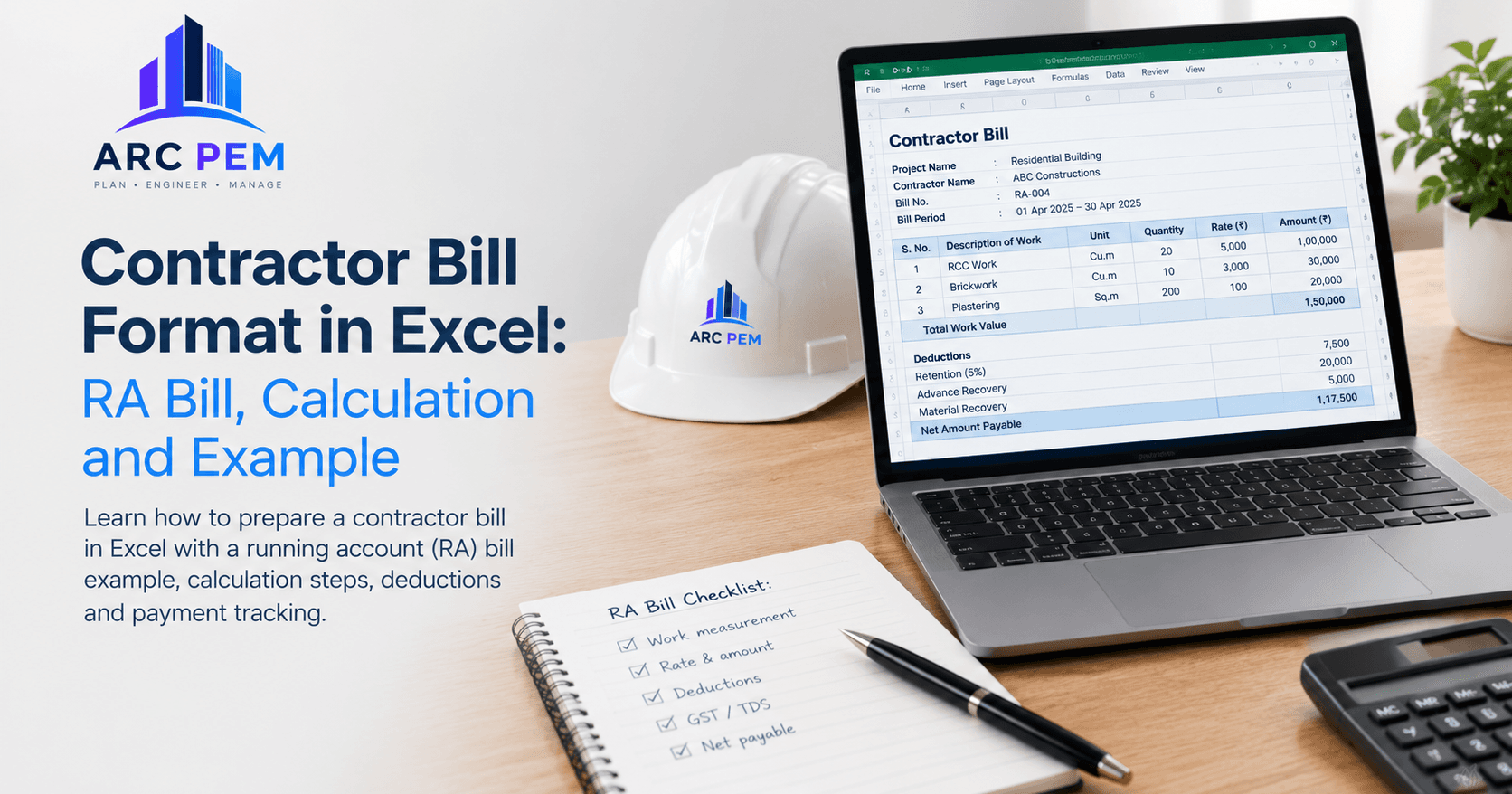
Include a table showing the work completed, its measurement, the agreed rate and the resulting amount.
| S. No. | Description of Work | Unit | Quantity | Rate (₹) | Amount (₹) |
|---|---|---|---|---|---|
| 1 | RCC work | Cu. m | 20 | 5,000 | 1,00,000 |
| 2 | Brickwork | Cu. m | 10 | 3,000 | 30,000 |
| 3 | Plastering | Sq. m | 200 | 100 | 20,000 |
| Total | 1,50,000 |
Illustrative rates and quantities only. Actual units, measurements and rates must follow the work order and certified measurement records.
3. Deductions and payment details
Depending on the contract, the bill may also require separate entries for:
- Retention money (see our guide to retention money, advances and TDS)
- Recovery of mobilisation or other advances
- Materials supplied by the client
- Penalties or other agreed recoveries
- Applicable income-tax TDS
- GST TDS, where legally applicable
- Previous payments or other adjustments
Do not combine all deductions into a single unexplained figure. Each deduction should have a description, calculation basis and supporting record.
How to Calculate an RA Bill: Formula and Example
The most important part of an RA bill is distinguishing the total work completed to date from the amount already billed in previous periods.
Basic formula:
Current-period bill value = Cumulative value of work completed to date − Previous cumulative value already billed or certified.
The precise calculation should follow the project's billing and certification rules.
Worked RA bill example
Suppose a contractor is executing civil work for a residential construction project. The following amounts have been verified for the current billing stage.
| Particulars | Amount |
|---|---|
| Cumulative value of work completed to date | ₹12,50,000 |
| Less: Previous cumulative work value already billed | ₹9,00,000 |
| Current-period gross work value | ₹3,50,000 |
The current-period gross work value is ₹3,50,000.
Now assume the contract specifies the following deductions for this example:
| Particulars | Calculation | Amount |
|---|---|---|
| Current-period gross work value | ₹12,50,000 − ₹9,00,000 | ₹3,50,000 |
| Less: Retention | 5% × ₹3,50,000 | ₹17,500 |
| Less: Advance recovery | As per agreed schedule | ₹20,000 |
| Less: Material recovery | As per certified record | ₹5,000 |
| Net amount before applicable taxes and other adjustments | ₹3,50,000 − ₹17,500 − ₹20,000 − ₹5,000 | ₹3,07,500 |
In this illustration, the amount remaining after the listed deductions is ₹3,07,500, before applicable taxes and other statutory adjustments.
Important: The 5% retention rate and the recovery amounts above are illustrative, not universal rates. GST, TDS and other adjustments must be handled separately using the applicable law, contract terms and correct tax base. The final payment may differ.
Excel Formulas for Contractor Bill Calculation
Excel can automate repetitive calculations and reduce arithmetic errors.
Assume the worksheet uses these columns:
- Column A: Serial number
- Column B: Work description
- Column C: Unit
- Column D: Quantity
- Column E: Rate
- Column F: Amount
Formula 1: Calculate the work amount
In cell F2, enter:
=D2*E2
This multiplies the measured quantity by the agreed rate.
Copy the formula down for the remaining work items.
Formula 2: Calculate total work value
If the work amounts are in cells F2 to F20:
=SUM(F2:F20)
This returns the total of the listed work items.
Formula 3: Calculate retention
If the current-period gross value is in F21 and the agreed retention percentage is in B23:
=F21*B23
Format B23 as a percentage and enter the contractual rate, such as 5%.
Formula 4: Calculate net payable before applicable taxes
If the gross work value is in F21, retention is in F22, advance recovery is in F23 and material recovery is in F24:
=F21-SUM(F22:F24)
Adjust the cell references to match your actual worksheet. Keep statutory taxes and any additional adjustments in separate, clearly labelled rows.
Formula 5: Calculate current-period work from cumulative values
If cumulative work completed is in B2 and the previously billed cumulative amount is in B3:
=B2-B3
This calculates the current-period value before any other deductions.
Recommended Excel layout
For a more reliable contractor bill workbook, use separate sections for:
- Contractor and project information
- Certified measurements and work amounts
- Previous bills and cumulative values
- Retention and other contractual recoveries
- Applicable GST and statutory deductions
- Net payable, amount in words and approval details
- Payment date, amount paid and outstanding balance
Keep a separate record of each RA bill rather than overwriting an earlier bill. This creates a clear audit trail and makes reconciliation easier.
What Is the Difference Between Gross Bill Amount and Net Payable?
The gross bill amount represents the value of work billed before the relevant deductions and adjustments.
The net payable is the amount remaining after applying the contractually agreed recoveries and the applicable tax treatment.
For example, a gross work value of ₹3,50,000 does not automatically mean the contractor should receive ₹3,50,000. Retention, advance recovery, materials supplied by the client, GST treatment and statutory deductions can change the amount payable.
A bill should therefore show the gross amount, each deduction and the final payable amount separately.
Common Mistakes in Contractor Bills
1. Billing work without certified measurements
Quantities should be supported by the measurement book, approved measurement sheet or other records required by the contract.
2. Billing the same work twice
Compare the current cumulative work value against previously billed or certified amounts before preparing the next RA bill.
3. Applying incorrect contractual rates
Use the rates approved in the work order, including any formally approved variations.
4. Deducting retention or advances incorrectly
Retention and advance recovery should follow the agreement. Do not assume the same percentage or recovery schedule applies to every project.
5. Mixing up GST and TDS
GST and income-tax TDS are different. Their applicability, calculation bases and reporting requirements must be checked separately. GST TDS may also apply to specified deductors and transactions under the applicable rules.
6. Ignoring previous payments
Maintain a bill register with bill number, gross value, deductions, certified amount, payment received and outstanding balance.
7. Relying on an unchecked Excel formula
Protect formula cells where practical, verify totals before submission, and retain the supporting measurement and approval records.
GST and TDS on Contractor Bills
A contractor's invoice must reflect the applicable GST treatment and required invoice particulars when GST law applies.
Before submitting the bill, verify:
- Whether the contractor is required and eligible to charge GST
- The correct classification and applicable rate
- Whether CGST and SGST or IGST applies
- Whether income-tax TDS applies. For payments made from 1 April 2026, the contractor TDS provision formerly known as Section 194C sits under Section 393(1) of the Income-tax Act, 2025, with the same 1% and 2% rates. See our guide to TDS on contractor payments
- Whether GST TDS applies to the particular recipient and contract
- The applicable tax base, timing and reporting requirements
Not every contractor bill has the same tax treatment. For example, income-tax TDS depends on the applicable provisions and circumstances, while GST TDS has its own eligibility conditions.
Consult your CA or tax adviser where the applicable treatment is uncertain. Do not use a blanket deduction percentage for every contractor.
How to Maintain a Contractor Bill Register
A bill format records the details of an individual bill. A contractor bill register helps the accounts team monitor all bills across projects.
A practical register can include the following columns:
| Column | Purpose |
|---|---|
| Project name | Identifies the project |
| Contractor name | Identifies the contractor |
| Bill number | Provides a unique reference |
| Bill date | Records the submission date |
| Billing period | Identifies the period covered |
| Gross bill value | Records the gross work amount |
| Deductions | Tracks retention and recoveries |
| Net payable | Shows the amount due after adjustments |
| Amount paid | Records payment made |
| Outstanding balance | Tracks unpaid dues |
| Status | Submitted, under verification, approved or paid |
Review the register regularly to identify pending certifications, overdue payments and differences between contractor records and the project's accounts.
Excel vs Construction Billing Software
Excel can work well for a small number of bills, especially when one person maintains the records and the format is consistent.
As projects and contractors increase, however, separate spreadsheets can become difficult to reconcile. Teams may need to track contractor bills alongside vendor expenses, project budgets, GST records and outstanding payments. We compare the two approaches in Excel vs software for construction expense tracking.
ARC PEM is designed for Indian architecture firms, contractors and builders who want to manage project budgets, contractor bills, vendor expenses, labour costs and GST-related records in one desktop application. It also supports Tally export for accounting workflows.
If you need a bill document rather than a complete project-finance workflow, you can start with the free ARC PEM GST Contractor Bill Generator. It lets you prepare a contractor bill in your browser and print or save it as a PDF.
For ongoing project-cost control, explore ARC PEM, or see how a project moves from BOQ to final bill.
Conclusion
A reliable contractor bill format in Excel should do more than calculate the total. It should show what work was completed, how the bill was calculated, what deductions were applied and how much remains payable.
For RA bills, the most important checks are certified measurements, cumulative billing records, previous bills, contractual recoveries and the correct tax treatment.
Start with a consistent format, automate calculations where possible and maintain a bill register for payment tracking. If you need a quick contractor invoice, try the free ARC PEM GST Contractor Bill Generator. If you manage multiple projects and need better control over bills, budgets and outstanding payments, explore ARC PEM's construction finance management software, or view pricing.